Build a Dinosaur Getting Started
Day-one walkthrough for Pixel Gold Games’ Roblox tycoon — first hour to first Rebirth plan.
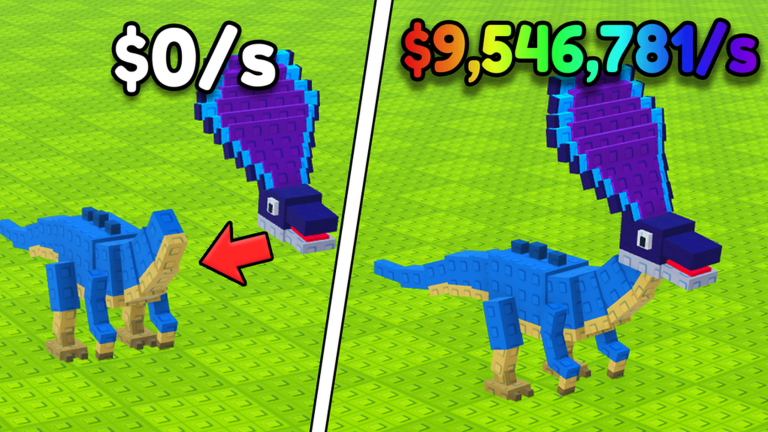
Build a Dinosaur is a Roblox tycoon simulator by Pixel Gold Games (place 123213321254818, released 2025-07-26). Servers hold up to six players. Your job is simple to say and fun to master: buy dinosaur parts, assemble a custom creature, earn Cash even while offline, protect everything with a base, and Rebirth when the math favors a reset. This beginner guide walks that path without fluff so you waste fewer Robux and fewer hours.
For the full tutorial index, return to the Guides Hub. For free rewards, keep Codes open. For part priorities later, skim the Tier List.
Before you press Play
- Open the official experience from Roblox and confirm you are in Build a Dinosaur by Pixel Gold Games.
- Join a server with room to breathe if you can — six-player lobbies can get chaotic when everyone races the same shops.
- Bookmark this wiki’s Links Hub for the game page and community destinations.
- Decide whether you will spend Robux early. The common passes are x2 Storage (299 Robux), x2 Cash (299 Robux), and Premium (about 1299 Robux). You do not need any of them to learn the game.
Your first ten minutes
Spawn in and locate the shop, your build area, and the path toward base defenses. Spend starter Cash on basic parts rather than hoarding. Place parts on your pad so the dinosaur silhouette starts to form. Confirm that Cash is increasing — that meter is the heartbeat of the tycoon.
If a part lands wrong, remember the delete rule early: double-click a part to remove it. That single control saves more beginner frustration than any pass. Full binding notes live on Controls.
Next, glance at the Store. Codes redeem through Store → Exclusive Store, then scroll to the bottom of that panel. Active strings and reward notes are maintained on Codes — claim them before you invest heavily so free Cash or items compound from minute one.
The core loop for new players
1. Buy parts
Parts are the building blocks of your dinosaur and, indirectly, of your income. Early shops look cheap; later tiers spike. Buy what you can place cleanly. A cluttered pad with overlapping junk is harder to defend and harder to upgrade. When you are unsure which limb or body piece is worth the spend, cross-check the Tier List after you understand placement.
2. Build a custom dinosaur
Placement is the fun fantasy of Build a Dinosaur. Aim for a stable, readable creature rather than a random pile. Leave yourself space to add higher-tier parts later. If you need to rebuild a section, double-click deletes keep the pad tidy without resetting the whole account.
3. Earn Cash (including offline)
Cash accrues while you play and continues offline. That means short sessions still matter: log in, collect, reinvest, lock the base, leave. Your overnight climb is only as safe as your defenses — which is why base work is not “endgame only.” Deep farming routes are covered in Earn Cash Fast.
4. Protect with a base
Other players share your server. An unprotected pad invites grief. Walls, gates, and smart layout turn offline income into real progress. Start a simple perimeter as soon as Cash allows, then refine with Build and Protect Base.
5. Rebirth when ready
Rebirth is the prestige button. Done too early, it stalls you. Done on time, it multiplies future climbs. Do not Rebirth on day one unless the game’s prompts and your Cash curve clearly say so. Read How to Rebirth before you commit.
Beginner checklist (first session)
- Buy and place a coherent starter dinosaur.
- Practice double-click delete on a cheap part so muscle memory sticks.
- Redeem any live codes via Exclusive Store (bottom).
- Confirm offline Cash works by rejoining after a short break.
- Place a minimal base shell before you log off for the night.
- Skim Updates once so you know the current patch vibe.
- Open Tools if you want planners later; ignore scripts until you understand the fair loop — see Scripts only with Roblox ToS in mind.
Common early mistakes
Ignoring codes. Free rewards stack with offline income. Check Codes every few days.
Skipping base work. A pretty dino with an open pad is a gift to rivals in six-player servers.
Buying every part in sight. Focus on pieces you can place and that improve the build. The Tier List helps once you outgrow random shopping.
Rebirthing for the badge feeling. Prestige is a multiplier tool, not a trophy spam button. Use How to Rebirth.
Never deleting. Fear of wasting Cash leads to messy pads. Double-click delete is free cleanup — details on Controls.
Should you buy passes as a beginner?
If you enjoy the loop and want a comfort boost, x2 Cash at 299 Robux is the most straightforward accelerator. x2 Storage at 299 Robux helps when inventory or part capacity feels tight. Premium near 1299 Robux is a larger commitment — wait until you know you will keep playing. Passes never replace learning placement, codes, and base discipline.
Where to go next
- Earn Cash Fast — squeeze more from online and offline time.
- Build and Protect Base — stop leaking progress to other players.
- How to Rebirth — plan your first prestige window.
- Controls — tighten movement and part management.
- Guides Hub — browse every tutorial in one list.
- Stay current with Updates, helpers on Tools, and destinations on the Links Hub.
Play the loop clean for one focused hour: parts, pad, Cash, base, codes. Everything else on this wiki — tiers, tools, scripts context, patch notes — builds on that foundation. Welcome to Build a Dinosaur; build something worth defending.
Frequently Asked Questions
Quick answers for Build a Dinosaur on Roblox.
Who made Build a Dinosaur and when did it release?
Pixel Gold Games released the Roblox tycoon on 2025-07-26 (place 123213321254818). Servers support up to six players.
How do beginners earn Cash in Build a Dinosaur?
Buy and place dinosaur parts so income ticks up. Cash also earns while you are offline. Reinvest into better parts and base defense, and claim codes from the Codes page.
How do I delete a part I placed wrong?
Double-click the part to delete it. See the Controls guide for more input tips.
Where do I redeem codes as a new player?
Open Store, go to Exclusive Store, and scroll to the bottom. Active codes are listed on the Codes hub.
Should I Rebirth in my first session?
Usually no. Learn the Cash loop and secure a basic base first, then read the How to Rebirth guide before prestiging.